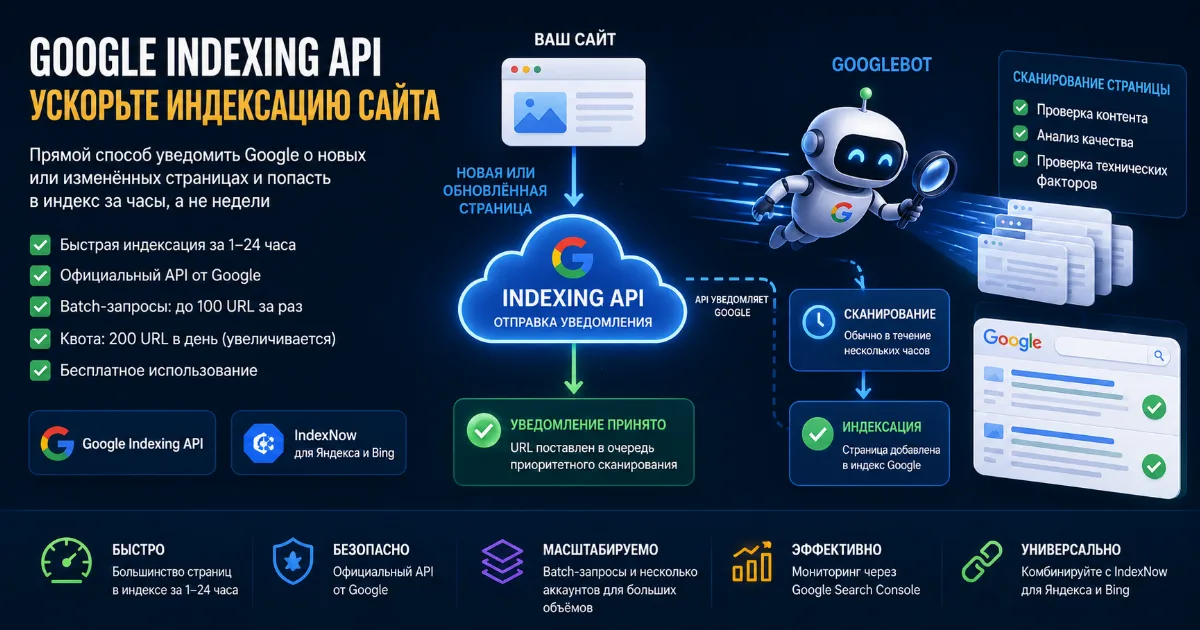
If you work in SEO or manage a website with many pages, you've probably faced this problem: new content gets published, but Google doesn't discover it for weeks. Traditional crawling works on its own schedule, and influencing it is difficult. That's exactly why Google created the Indexing API — a tool that lets you directly notify the search engine about new or updated URLs.
This guide covers everything you need to know about Google Indexing API in 2026: how it works, current quotas, recent changes, step-by-step setup, and the most effective ways to use it for faster website indexing.
What Is Google Indexing API and Why You Need It
Google Indexing API is a REST API that lets website owners and developers directly notify Google when pages are added, updated, or removed. Instead of waiting for Googlebot to discover your content through crawling, you send a direct signal: "this page changed — come crawl it now."
Without the API, the standard indexing cycle looks like this: you publish a page → Googlebot eventually finds it through sitemaps or links → the page gets crawled and enters the index. This process can take days to weeks, and for new sites — even months.
With Google Indexing API for faster indexing, the picture changes: you send a notification → Google puts the URL in a priority crawl queue → the page is crawled within hours. Based on real-world SEO experience, most URLs appear in the index within 1–24 hours after being submitted via the API.
Who Benefits Most from Google Indexing API
- News sites and blogs — when speed of appearing in search matters
- E-commerce stores — updating prices, stock, adding new products
- SEO specialists — bulk submission of backlinks for re-indexing
- Job boards — pages with JobPosting markup
- Dynamic content sites — frequently changing pages
- New websites — that haven't built up crawl budget yet
How Google Indexing API Works: Technical Overview

Technically, the API works through HTTP requests to a Google endpoint. Each request contains a URL and an action type. There are two main notification types:
- URL_UPDATED — page was added or updated, please crawl it
- URL_DELETED — page was removed, please drop it from the index
Important: submitting a notification via the API does not guarantee indexing. The API only puts the URL in a priority crawl queue. The final decision on whether to include the page in the index is made by Google based on content quality, technical page health, and other factors.
How the API Works — Step by Step
- You send a POST request to
https://indexing.googleapis.com/v3/urlNotifications:publish - The request is authenticated via OAuth 2.0 with a Google Cloud service account
- Google receives the notification and puts the URL in the priority crawl queue
- Googlebot visits the page — usually within a few hours
- After crawling, the page is analyzed for content quality
- If the page meets Google's standards — it enters the index
For bulk submission, the API supports batch requests — up to 100 URLs in a single request. This is much more efficient than submitting each URL separately.
Google Indexing API Quotas in 2026: Key Changes
Quotas are one of the most discussed topics among SEO specialists. Over the past two years, Google has made several changes to its quota documentation, and it's important to know the current state.
Default Quotas
2024 Quota Changes: What Google Clarified
In September 2024, Google made important clarifications to its quota documentation. Key changes:
Rephrased quota purpose. The old version stated: "quota may increase or decrease based on document quality." The new version reads: "The Indexing API provides the following default quota for initial API onboarding and testing submissions." This is a significant change — Google emphasizes that the standard 200 requests/day quota is meant for testing, not production use.
Fixed requests-per-minute limit. The old documentation listed 600 requests per minute. Google clarified: the value was always 380 — it was a documentation error.
Section renamed. "Request more quota" became "Request quota and approval," more accurately reflecting the process — increasing quota requires not just submitting a request, but getting Google's approval.
Tightened Enforcement in 2025
In May 2025, John Mueller from Google warned the SEO community: Google is seeing widespread abuse of the Indexing API by spammers. His recommendation — use the API strictly for documented and supported use cases. Gary Illyes had already warned in April 2024 that the API "might suddenly stop working for unsupported verticals."
In practice, this means Google has started more actively checking whether API usage aligns with documented requirements. Nevertheless, thousands of SEO specialists and services continue to successfully use the API for speeding up indexing of regular content.
How to Increase Google Indexing API Quota
The default limit of 200 URLs per day isn't enough for large sites. Here's how to get more:
- Go to Google API Console → "Quotas & System Limits" tab
- Select the "Publish requests per day" quota and click "Edit Quotas"
- Click "Apply for higher quota" and fill out the request form
- Provide project details, expected request volume, and justification
Important note: you may need to create a billing account in Google Cloud to submit the request. The API itself remains free — billing is only needed for administrative access to the quota request form.
Another scaling approach — use multiple service accounts. Each Google Cloud project gets its own 200 URL/day quota. Multiple projects = multiple quotas. This is exactly the approach used by professional indexing services.
Official Restrictions: What Pages the API Works For
Google's official documentation states: the Indexing API is designed for pages with JobPosting (job listings) or BroadcastEvent in VideoObject (live streams) markup. This restriction has existed since the API launched.
In practice, the situation is more nuanced. Years of SEO community experience show that the API works effectively for all page types — articles, product pages, category pages, backlinks. Many specialists and services successfully use it to speed up indexing of regular content.
Google intentionally leaves this "gray zone," while simultaneously warning about risks of abuse. Recommendation: use the API for quality content — don't submit spam pages or duplicates.
Step-by-Step Google Indexing API Setup
Step 1: Create a Project in Google Cloud Platform
- Go to console.cloud.google.com
- Click "Create Project," enter a name
- In "APIs & Services" → "Library," find "Indexing API" and enable it
Step 2: Create a Service Account
- Go to "IAM & Admin" → "Service Accounts"
- Click "Create Service Account," enter name and description
- No role assignment needed — it's not required for the Indexing API
- After creation, go to the account → "Keys" tab → "Add Key" → "JSON"
- Download the JSON key file — you'll need it for authentication
Step 3: Connect to Google Search Console
- Open Google Search Console
- Select your site → "Settings" → "Users and permissions"
- Click "Add user" and enter the service account email (format:
name@project.iam.gserviceaccount.com) - Assign "Owner" role — without this, the API won't accept requests
Step 4: Submit URLs via API
Example Python batch request to submit 100 URLs at once:
from google.oauth2 import service_account
from googleapiclient.discovery import build

SCOPES = ["https://www.googleapis.com/auth/indexing"]
KEY_FILE = "service_account.json"

credentials = service_account.Credentials.from_service_account_file(
    KEY_FILE, scopes=SCOPES
)
service = build("indexing", "v3", credentials=credentials)

urls = [
    "https://example.com/page-1",
    "https://example.com/page-2",
    # ... up to 100 URLs
]

batch = service.new_batch_http_request()
for url in urls:
    batch.add(service.urlNotifications().publish(
        body={"url": url, "type": "URL_UPDATED"}
    ))
batch.execute()
IndexNow — Alternative and Complement to Google Indexing API
While Google restricts its API to official use cases, Microsoft and Yandex jointly developed the IndexNow protocol. It's an open standard for notifying search engines about site changes.
Key differences from Google Indexing API:
The optimal strategy in 2026 — combine both tools: Google Indexing API for Google, IndexNow for Yandex and Bing. This is exactly how professional indexing services work, ensuring coverage across all major search engines.
Why Pages Don't Get Indexed Even After API Submission
This is the most common question from beginners. The API is not a magic button — it only speeds up crawling. If a page still doesn't appear in the index after submission, check the following:
Technical Issues
- Page blocked from indexing via
<meta name="robots" content="noindex"> - Googlebot blocked in robots.txt for that section of the site
- Page returns a non-200 status code (redirects, 404, 500)
- Slow server response time
- Page inaccessible to crawling due to JavaScript rendering
Content Issues
- Page is a duplicate of another URL — Google picks the canonical version
- Content is too thin or uninformative
- Page is flagged as spam or has signs of manipulation
- No internal linking — the page is "floating in space"
- No incoming links even from other pages on the site
Quota Issues
- Daily limit of 200 URLs exceeded — API returns 429 error
- Too frequent requests — exceeded 380 requests per minute limit
- Service account not added to GSC as an Owner
Best Practices for Using Google Indexing API in 2026
1. Only Submit Quality Content
Don't waste quota on duplicates, thin content, or pages with technical issues. Google tracks the ratio of submitted to actually indexed URLs — a poor "conversion rate" may lower the priority of your future requests.
2. Use Batch Requests
Submit URLs in batches of 100 instead of individual requests. This saves time and reduces load on per-minute API limits.
3. Prioritize Important Pages
With a 200 URL/day limit, submit commercially important pages first: homepage, category pages, top products. Informational pages come second.
4. Use Multiple Service Accounts
If 200 URLs/day isn't enough — create multiple Google Cloud projects. Each gets its own quota. This is a completely legitimate approach.
5. Monitor Results via GSC
After submission, check page status using the URL Inspection tool in Google Search Console. Look for: whether the bot visited the page, what verdict was issued, any technical errors.
6. Combine with IndexNow
Simultaneously submit URLs via IndexNow — it's free, requires no complex setup, and ensures indexing in Yandex and Bing.
7. Set Up Automatic Submission
Integrate the API into your CMS: when a new page is published or an existing one updated — automatically send a notification. WordPress has ready plugins, Laravel and other frameworks have libraries.
Indexing Services Based on Google Indexing API
Setting up the API yourself requires technical knowledge and time. For SEO specialists who want results without diving into Google Cloud Console, there are specialized URL indexing services.
Such services handle all the technical work:
- Managing multiple API keys to work around quota limits
- Bulk URL submission with optimal time distribution
- Monitoring Googlebot visits and indexing status
- Automatic refunds if the bot doesn't visit
- Simultaneous submission to Google, Yandex, and Bing via IndexNow
The cost of such services is typically from $0.001 to $0.005 per URL — at volumes of thousands of URLs, this is significantly cheaper than manual work.
Google Indexing API FAQ
Does the API guarantee indexing?
No. The API only guarantees priority crawling. Indexing cannot be guaranteed — it's decided by Google based on content quality.
Is Google Indexing API paid?
No, using the API is completely free. A billing account in Google Cloud may be required to request increased quota, but actual API usage is not charged.
How quickly does a page get indexed after API submission?
Googlebot typically visits the page within a few hours. Actual appearance in the index takes from a few hours to 24 hours for quality pages.
Can I submit regular pages (not job listings)?
Officially, the API is for JobPosting and BroadcastEvent pages. In practice, it's widely used for any content. Google periodically warns about risks of using it for unsupported scenarios.
What happens when quota is exceeded?
The API returns error 429 Too Many Requests. Requests above the limit simply won't be processed — no penalties, but the URLs won't enter the queue.
How many service accounts can I create?
Google Cloud allows creating multiple projects, each with their own service accounts and quotas. There's no limit on the number of projects, but each should be tied to a separate Google account in GSC.
Conclusion: Is Google Indexing API Worth Using in 2026
Despite official restrictions and periodic warnings from Google employees, the Indexing API remains one of the most effective tools for speeding up page indexing in Google. Thousands of SEO specialists and services use it successfully every day.
Key takeaways:
- Default quota is 200 URLs per day, can be increased via request form
- In 2024–2025, Google clarified documentation and tightened control over abuse
- The API is effective for quality content — not for spam
- Best to combine with IndexNow for coverage across all search engines
- For large URL volumes, specialized indexing services are more convenient
If you want to speed up your site's indexing without complex technical setup — use ready-made services that have already integrated Google Indexing API and IndexNow into a convenient interface.