
Search engines are no longer the only source of traffic. Millions of people now get answers through ChatGPT, Claude, Perplexity, Grok and other AI assistants — without ever clicking through to a website. If your site is invisible to AI models, you're missing a rapidly growing channel of organic citations and traffic.
This guide covers what AI visibility is, how to measure it, what 12 factors affect whether your pages appear in AI answers, and how to improve each one using the AI Visibility Audit tool from IndexerPro.
What Is Website AI Visibility?
AI visibility is your website's ability to be crawled, understood, and cited by large language models (LLMs). Unlike classical SEO where PageRank and backlinks dominate, AI crawlers prioritize different signals:
Companies like OpenAI (GPTBot), Anthropic (ClaudeBot), and Perplexity (PerplexityBot) actively crawl the web and update their knowledge bases. If your pages don't make it into those bases — you simply don't exist in AI answers.
How IndexerPro AI Visibility Audit Works
IndexerPro provides an AI Audit tool that analyzes any page across 12 criteria and returns a score from 0 to 100. Cost: 50 points per URL (~$0.05), and the first re-audit within 24 hours is free.
How to run an audit:
After making improvements, run a re-audit of the same URL — it's free once within 24 hours.

12 AI Visibility Metrics: A Complete Breakdown
The total score is split into three groups: technical factors (40 points), semantics (35 points), retrieval (25 points). Here's a detailed look at each metric.
1. HTTP Status (0–10 points)
What's checked: the server response code when the page is requested.
Why it matters: AI crawlers, like search bots, don't index pages returning 4xx (client errors) or 5xx (server errors). Redirects (301/302) reduce the chance of indexing — the bot may not wait for the final destination.
2. TTFB Speed (0–10 points)
What's checked: Time To First Byte — time from request to first byte of response.
Why it matters: AI crawlers operate with a ~15 second timeout. Slow pages (TTFB > 4–5s) get skipped or indexed less frequently. A good target is under 500ms.
How to improve:
3. Page Size (0–10 points)
What's checked: HTML response size in kilobytes.
Why it matters: Pages under 100KB are fully processed by AI crawlers. At 100–300KB, partial processing may occur. Pages over 500KB are often truncated — part of the content is lost.
How to improve: move inline styles and scripts to external files, avoid base64-encoded images in HTML, remove unused classes and attributes.
4. JS Dependency (0–10 points)
What's checked: number of JavaScript files loaded and signs of JS-only rendering.
Why it matters: Most AI crawlers (GPTBot, ClaudeBot, PerplexityBot) do not execute JavaScript. If page content loads via JS — the crawler sees a blank page. Many scripts suggest an SPA (React/Vue/Angular) without SSR.
How to improve:
5. AI Bot Access (0–10 points)
What's checked: robots.txt rules for major AI crawlers.
Why it matters: If robots.txt has Disallow: / for GPTBot, ClaudeBot or PerplexityBot — they cannot crawl the site at all, even if you explicitly submitted the URL through IndexerPro.
Checked bots: GPTBot (OpenAI), ClaudeBot (Anthropic), PerplexityBot, Google-Extended (Gemini), CopilotBot (Microsoft), Googlebot.
Correct robots.txt for AI bots:
User-agent: GPTBot
Allow: /
Disallow: /admin
Disallow: /api

User-agent: ClaudeBot
Allow: /
Disallow: /admin

User-agent: PerplexityBot
Allow: /
Disallow: /admin
6. Semantic HTML (0–10 points)
What's checked: presence of semantic tags: <article>, <main>, <section>, <nav>, <aside>.
Why it matters: AI crawlers use semantic markup to identify the main content area. Without an <article> tag, it's hard to separate the article body from navigation, ads, and footers — this reduces extraction quality.
How to improve: wrap main article content in <article>, use <main> for the primary content area, <nav> for navigation, add <time datetime="..."> to dates.
7. Headings H1–H3 (0–10 points)
What's checked: heading structure: H1 presence, number of H2s, H3 presence.
Why it matters: LLMs use headings as a table of contents for navigating content. One clear H1 = page topic. H2 = sections. H3 = subsections. Missing structure or multiple H1s reduces model comprehension.
8. Chunk Quality (0–8 points)
What's checked: text block structure — number of paragraphs and their length.
Why it matters: RAG systems (Retrieval Augmented Generation) slice text into 300–800 character chunks before storing in a vector database. Paragraphs over 1200 characters get cut arbitrarily, losing context.
How to improve: write short paragraphs — one paragraph, one idea. Break long explanations into numbered steps. Use lists instead of dense prose blocks.
9. FAQ and Lists (0–7 points)
What's checked: presence of FAQ sections, bullet/numbered lists, and tables.
Why it matters: LLMs were trained on vast amounts of Q&A content. Pages with FAQ sections are cited in AI answers 3–5x more often than plain prose. Structured data (tables, lists) is extracted more accurately.
How to improve: add a "Frequently Asked Questions" section with questions in H3 tags and answers in paragraphs. Use <ul> and <ol> for enumerations instead of comma-separated sentences.
10. Schema.org (0–10 points)
What's checked: presence of JSON-LD Schema.org markup in the page <head>.
Why it matters: Schema.org is a machine-readable "identity card" for a page. AI crawlers use it to precisely understand content type: is this an article, organization, FAQ, or product? Adding Article + FAQPage schema significantly improves indexing accuracy and citation likelihood.
Minimum schema for a blog post:
<script type="application/ld+json">
{
  "@context": "https://schema.org",
  "@type": "Article",
  "headline": "Article Title",
  "datePublished": "2026-05-13",
  "dateModified": "2026-05-14",
  "author": {"@type": "Organization", "name": "IndexerPro"},
  "publisher": {"@type": "Organization", "name": "IndexerPro"}
}
</script>
11. Content Freshness (0–8 points)
What's checked: freshness signals — <time datetime> tag, article:published_time and article:modified_time meta tags, Last-Modified HTTP header.
Why it matters: AI crawlers prioritize fresh content during crawls and in answers. "Published 2026" outweighs "Published 2020" for equal-quality pages. Without explicit date signals, crawlers don't know how current the information is.
How to add:
<!-- In head -->
<meta property="article:published_time" content="2026-05-13T10:00:00Z">
<meta property="article:modified_time" content="2026-05-14T09:00:00Z">

<!-- In content -->
<time datetime="2026-05-13">May 13, 2026</time>
12. Trust Signals (0–7 points)
What's checked: E-E-A-T signals — author information, contact details, links to authoritative sources.
Why it matters: AI models evaluate source reliability both during training and at retrieval time. A site with no author, no contact page, and no references to primary sources is treated as less trustworthy. Google explicitly uses E-E-A-T (Experience, Expertise, Authoritativeness, Trustworthiness) for AI Overview ranking.
How to improve: name the article author with credentials, add an "About" page, link to official documentation (Google Developers, W3C, MDN).
How to Interpret the Total Score
Real example: an IndexerPro blog article after optimizing all 12 factors scored 92/100: TTFB 10/10, headings 10/10, page size 10/10, HTTP 10/10, AI bot access 10/10, chunk quality 8/8, Schema.org 10/10, freshness 8/8.
Prioritization: Where to Start
If your score is low, fix issues in this order by impact:
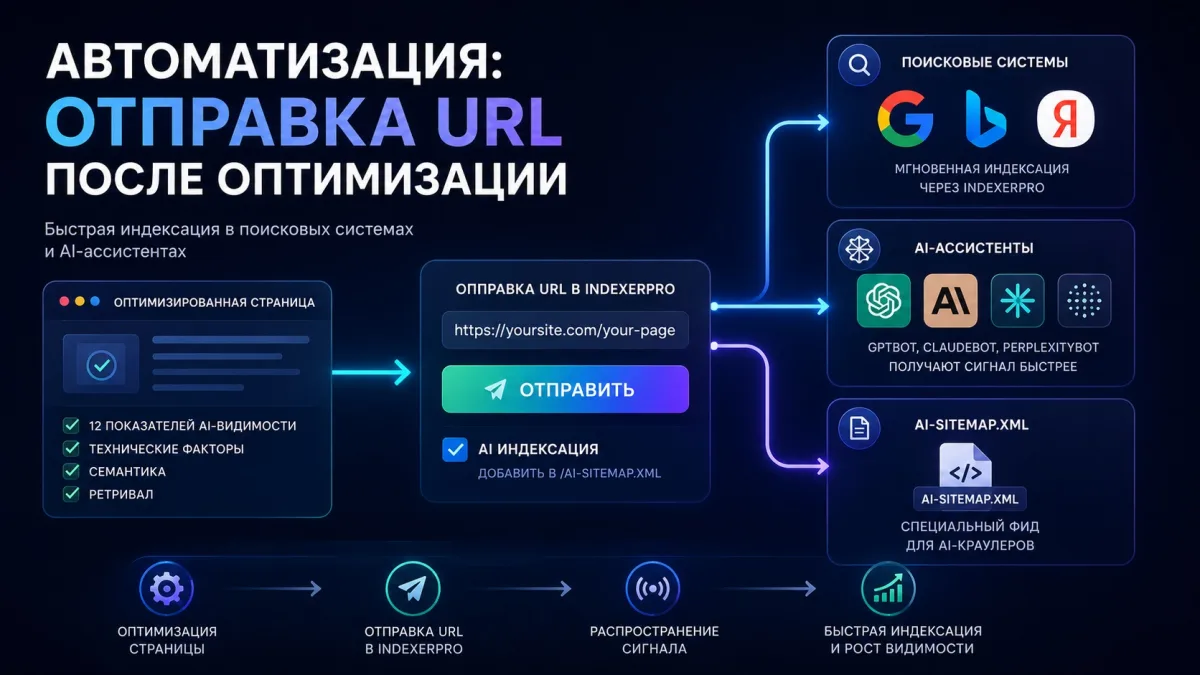
Automation: Submitting URLs After Optimization
After fixing issues, don't forget to resubmit URLs for re-indexing. IndexerPro submits pages through two channels simultaneously:
Also check the "AI Indexing" checkbox when submitting — the URL will be added to a special feed at /ai-sitemap.xml, which GPTBot, ClaudeBot and PerplexityBot regularly crawl.
Frequently Asked Questions
How often should I run an AI audit?
After every significant page change — content edits, structural changes, CMS updates. For actively updated sites, a monthly audit is recommended. The first re-audit within 24 hours of the original is always free.
Does AI visibility affect Google search rankings?
No direct correlation, but indirectly — yes. Many AI visibility factors overlap with classical SEO requirements: page speed, heading structure, Schema.org, semantic tags. Optimizing for AI simultaneously improves traditional SEO.
What if the audit shows 0/10 for bot access, but bots are explicitly allowed?
Check the rule order in robots.txt. Rules for specific bots must come AFTER the general User-agent: * block. Also make sure there's no blank line between User-agent and Allow/Disallow — blank lines end a section.
How quickly do AI crawlers respond to changes?
GPTBot crawls popular pages roughly every few weeks. ClaudeBot visits the IndexerPro site every 2 hours — visible in the AI Analytics section. Submitting through IndexerPro sends a faster signal to crawlers.
Can I audit competitors' pages?
Yes, the AI Audit works for any public URL. Enter a competitor's page URL and get their score across the same 12 criteria. This is useful for benchmarking and understanding why a competitor gets cited in AI answers more often.
What if a page scores high but still isn't cited in ChatGPT?
A high score means technical readiness for indexing, but doesn't guarantee citation. Citations also depend on domain authority, information uniqueness, and query relevance. Consistently publish quality content and build backlinks over time.
Conclusion
AI visibility is becoming the new SEO — ignoring it means voluntarily giving up a growing traffic channel. IndexerPro's AI Audit tool gives you a complete picture in 30 seconds: what's preventing your pages from appearing in ChatGPT, Claude, and Perplexity answers.
Start with an audit of your homepage and one key blog article. Fix the critical issues — robots.txt, Schema.org, headings — and run a re-audit. Within a few weeks, you'll see increased citation rates in AI assistants.